

UltDroid APK 1.7

Advertisement
UltDroid APK is an Android performance utility focused on system-level game performance control. It helps manage CPU, GPU, and memory behavior during gameplay, improving stability, responsiveness, and consistency without modifying game data or requiring root access. Designed for players who want greater control over how their device handles gaming workloads, UltDroid supports smoother sessions across a wide range of Android devices.
Information of UltDroid
About UltDroid
UltDroid APK – System-Level Game Performance Control
Mobile gaming on Android has evolved quickly, but performance limitations still affect many players. Even on capable devices, issues such as frame drops, stuttering, delayed touch response, and excessive heat can appear during longer or more demanding gaming sessions. These problems often break immersion and make competitive play feel inconsistent.
UltDroid APK addresses this situation from a different angle. Instead of relying on simple presets or short-term performance boosts, it focuses on system-level game performance control. The goal is to help Android manage its resources more effectively while you play, keeping performance stable and predictable rather than pushing brief spikes that fade quickly. This approach prioritizes control, consistency, and long-term usability.
What Is UltDroid APK
UltDroid APK is an Android performance utility designed specifically for gaming scenarios. It does not act as a traditional game launcher, and it is not limited to basic memory cleaning. Instead, UltDroid works by influencing how the Android system behaves when a game is running.
At its core, UltDroid provides tools that allow you to guide CPU scheduling, GPU rendering behavior, memory usage, and background process prioritization during gameplay. These changes operate at the system level, meaning they affect how Android allocates resources before and while a game is active, rather than altering the game itself.
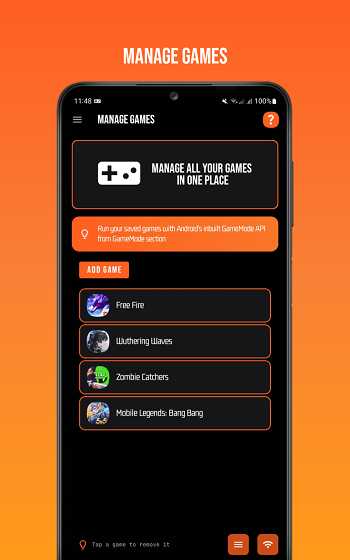
This distinction matters. UltDroid does not modify game data, interfere with online connections, or change server interactions. Its role is to help the operating system focus on gaming workloads more efficiently. As a result, gameplay tends to feel smoother and more consistent, especially during demanding moments.
UltDroid APK is designed for users who want greater awareness and control over how their device performs under gaming load, particularly those who feel constrained by default Android performance management.
Why System-Level Control Matters for Android Gaming
Android is built to balance performance, battery life, and thermal safety across many different tasks. This balanced design works well for everyday use, but it can limit gaming performance by distributing resources conservatively, even when additional power is available.
Many common gaming issues originate at the system level rather than from the game itself. Background services, sync tasks, notifications, and power management routines can interrupt gameplay at critical moments. When combined with thermal limits, these factors often lead to FPS drops, micro-stutter, and inconsistent responsiveness.
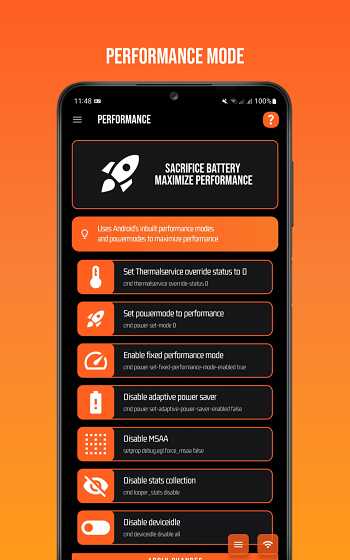
Most optimization apps attempt to solve this by clearing memory or closing background apps temporarily. While this can help in the short term, it rarely addresses the deeper scheduling and prioritization mechanisms that control how Android handles heavy workloads.
System-level control matters because it allows performance adjustments to remain active throughout a gaming session. By influencing how resources are allocated, prioritized, and reclaimed, this approach supports stability instead of relying on brief performance gains that disappear after a few minutes. UltDroid APK is built around this principle, aiming for consistency rather than chasing peak benchmark numbers.
How UltDroid Controls Game Performance
Modern Android games push hardware harder than ever, making performance control more important than simple optimization shortcuts. To understand why UltDroid behaves differently from typical gaming tools, it helps to look at how it interacts with the Android system itself. This section explains the core mechanisms behind UltDroid’s system-level approach and how it influences performance before and during gameplay.
System-Level Optimization Explained
System-level optimization refers to adjustments that influence how the operating system manages hardware resources. Unlike app-level tools that operate within standard permission limits, system-level control affects behaviors such as task prioritization, rendering pathways, and overall resource allocation.
UltDroid applies its optimizations before and during gameplay, shaping how Android responds to gaming workloads. This helps reduce sudden performance drops and keeps the active game as the system’s main priority while it is running. The outcome is not an artificial performance spike, but a more stable and predictable gaming experience.
Shell-Based Performance Commands
UltDroid relies on shell-based commands to apply performance adjustments. These commands allow controlled interaction with system parameters without permanently altering configuration files.
Advertisement
Advertisement
Instead of using fixed presets, UltDroid executes commands dynamically based on selected modes and user preferences. This approach supports fine-tuning while keeping changes reversible. You can apply adjustments, observe the result during gameplay, and revert them if needed.
Shell-based control offers transparency and precision. Rather than hiding changes behind generic buttons, UltDroid lets you understand that performance adjustments are deliberate and manageable.
CPU, GPU, and RAM Resource Control
Gaming performance depends on how well CPU, GPU, and memory resources work together. UltDroid addresses each of these components as part of its system-level strategy.
For the CPU, UltDroid helps prioritize the active game process, reducing interruptions from background tasks. This leads to more consistent responsiveness during intense gameplay moments.
On the GPU side, UltDroid supports adjustments that influence rendering behavior and graphics pipeline efficiency. These changes aim to reduce frame instability while staying within safe operating limits.
Memory management is handled selectively. Instead of aggressively terminating background processes, UltDroid focuses on freeing resources in a controlled way. This preserves system stability while making more memory available for the game you are playing.
Game-Specific Performance Prioritization
Different games place different demands on a device. A fast-paced action game emphasizes responsiveness and frame stability, while open-world titles often require sustained memory and rendering performance.
UltDroid allows performance management on a per-game basis, aligning system resources with the needs of the active title. This targeted approach avoids unnecessary adjustments and reduces the drawbacks of one-size-fits-all optimization methods.
By focusing resources on the running game, UltDroid minimizes interference from background services and system processes that are not essential during gameplay.
Renderer and Graphics Pipeline Management
The graphics renderer plays a major role in how frames are produced and displayed. Android devices support multiple rendering options, each with its own performance and compatibility characteristics.
UltDroid allows you to experiment with available renderers and graphics pipeline settings to find what works best for your specific hardware. There is no universal best option; the optimal configuration depends on the device model, Android version, and game engine.
This flexibility lets you balance visual quality and performance stability based on your preferences and hardware limits.
Advanced Permissions Without Root
Many system-level tools require deep system access, which can introduce risks and compatibility concerns. UltDroid avoids this requirement by using advanced permission methods that provide elevated control without modifying protected system areas.
This design allows UltDroid to apply meaningful performance adjustments while maintaining system integrity. You retain the ability to uninstall the app or reset settings without long-term complications.
Reversible and Safe Performance Adjustments
A key principle behind UltDroid APK is reversibility. All performance adjustments are designed to be temporary and adjustable, allowing you to experiment without fear of permanent impact.
If a specific configuration does not deliver the desired results, it can be reverted easily. This safety-focused approach encourages responsible tuning and supports long-term use across different games and devices.
Core Performance Features
UltDroid APK focuses on features that support system-level control, not convenience shortcuts. Each feature is designed to help you influence how Android behaves during gameplay, rather than forcing generic changes that may not suit every device or game.
Key performance-oriented features include:
-
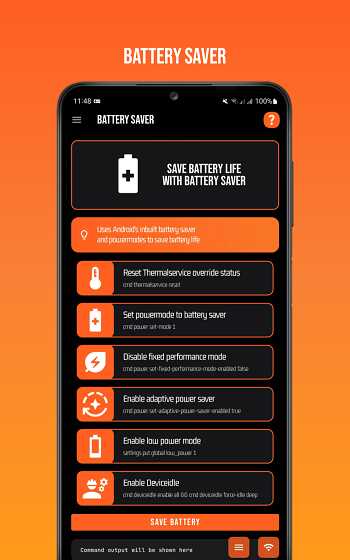
Performance and Battery Modes
These modes allow you to decide how aggressively the system should prioritize gaming tasks. Performance mode focuses on responsiveness and stability, while battery-oriented settings help maintain balance during longer sessions.Advertisement
-
Memory and Cache Management
UltDroid provides controlled memory handling instead of aggressive background termination. This approach reduces the risk of system instability while still freeing resources for active games.
-
Renderer Selection Options
The ability to switch renderers gives you flexibility when dealing with different game engines and hardware combinations. This helps fine-tune frame stability without unnecessary visual compromises. -
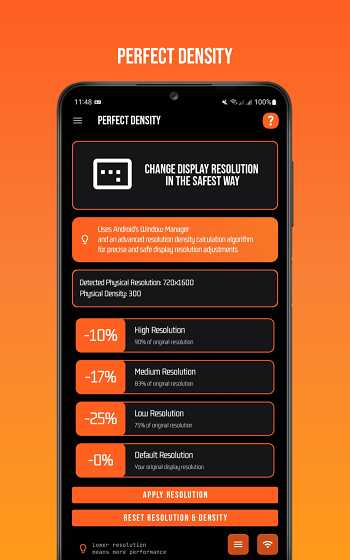
Resolution and Density Adjustments
Where supported, these options allow you to manage display behavior in a way that aligns better with performance goals, especially on mid-range or older devices.
Rather than overwhelming you with excessive toggles, UltDroid keeps its feature set focused on adjustments that directly influence gaming performance and system behavior.
Real Gaming Benefits You Can Feel
System-level control becomes noticeable through consistency rather than sudden spikes. Many players experience smoother camera movement, fewer frame drops, and more reliable touch response during demanding moments.
During longer gaming sessions, performance tends to remain stable instead of gradually degrading. This stability often results from better thermal behavior, as controlled resource allocation reduces sudden load changes that trigger aggressive throttling.
The overall experience feels more predictable. Instead of fluctuating performance that depends on short-lived boosts, gameplay maintains a steady rhythm that supports focus and immersion. These benefits are especially noticeable in fast-paced or competitive games where timing and responsiveness matter.
Safety, Stability & Compatibility
UltDroid APK is built with safety and long-term use in mind. It does not modify game files, alter online interactions, or interfere with protected system components. All adjustments focus on how Android manages resources, not on the games themselves.
Because changes are reversible and do not depend on permanent system modification, UltDroid can be used confidently across different devices. Compatibility spans a wide range of Android versions and hardware configurations, making it suitable for both newer and older phones.
This focus on stability helps ensure that performance improvements do not come at the cost of reliability.
Who Should Use UltDroid APK
UltDroid APK is best suited for players who value control and consistency over quick fixes. Competitive gamers, users who play demanding titles, and those using mid-range or aging devices often see the greatest benefit.
It also appeals to users who want to understand how their device behaves under load and prefer to make informed adjustments. If you enjoy fine-tuning performance rather than relying on automatic presets, UltDroid provides the tools to do so.
Casual players looking for instant, one-tap solutions may find simpler tools sufficient. UltDroid is designed for users who want deeper involvement in performance management.
When UltDroid Is Better Than Typical Game Boosters
Traditional game boosters emphasize simplicity. They often rely on temporary memory cleanup or predefined presets that offer short-term improvement with minimal user input.
UltDroid takes a different approach. It prioritizes sustained performance and stability through system-level control, making it more suitable for longer sessions and demanding games. While this requires more engagement from the user, it also delivers more predictable results.
Both approaches serve different needs. UltDroid stands out when you want to actively manage how Android allocates resources rather than relying on automated shortcuts.
Final Thoughts
UltDroid APK represents a deliberate and controlled approach to Android gaming performance. By focusing on system-level behavior instead of surface-level tweaks, it gives you the ability to shape how your device handles gaming workloads.
This approach may not appeal to everyone, but for players who value understanding, stability, and control, UltDroid offers a practical framework for improving performance without compromising system integrity. In an environment filled with quick solutions, its emphasis on thoughtful optimization makes it a solid option for serious mobile gaming.
FAQs UltDroid
UltDroid APK is used to control Android game performance at the system level. It helps manage how CPU, GPU, and memory resources are allocated during gameplay, aiming to improve stability, responsiveness, and overall consistency without modifying game files.
No, UltDroid APK does not require root access. It uses advanced permissions to apply system-level performance adjustments while keeping the device secure and easy to restore. This makes it suitable for users who want deeper control without permanently changing their system.
Yes, UltDroid APK is designed with safety and reversibility in mind. It does not alter game data, interfere with online services, or make permanent system changes. All adjustments can be reverted, allowing stable long-term use across different games and devices.
Most game booster apps rely on temporary memory cleanup or preset optimizations. UltDroid APK focuses on system-level game performance control, allowing more precise management of system behavior during gameplay. This approach prioritizes consistent performance rather than short-lived boosts.
UltDroid APK is best suited for gamers who want stable performance and greater control over their device. Competitive players, users running demanding games, and those using mid-range or older Android devices often benefit the most from its system-level optimization approach.






Share Your Thoughts